● E-Way Bill Guides · Last checked: November 2026
E-Way Bill Distance: How the PIN-to-PIN Check Works
Blog · Published 11 November 2026 · 8 min read
The e-way bill distance is the road distance between the PIN code the goods leave from and the PIN code they are delivered to. When you type both PIN codes, the portal fills in an approximate distance from its own PIN-to-PIN database. You can raise it by up to 10% if your real route is longer, and the validity of the bill is worked out from the figure you finally submit.
You can also look up the distance before you generate anything, without logging in. The steps for both are below, along with the cases where the portal does not behave the way people expect.
Independent guide: ewaybillinfo.com is not the government E-Way Bill or GST portal and has no link with GSTN, NIC or the Government of India. We never ask for your password or OTP. Enter them only on the official ewaybillgst.gov.in or ewaybill2.gst.gov.in sites.
How the portal works out the distance
NIC added automatic distance calculation to the E-Way Bill System in April 2019. The official E-Way Bill FAQ says the system calculates the distance between source and destination from the PIN codes you enter, and that any distance you type in is limited to 10% more than the figure it shows.
NIC calls this figure the estimated motorable distance. It is a road distance, not a straight line on a map, so it will often differ from what Google Maps shows for your exact route. Here are the rules the system applies:
| Situation | What the portal does |
|---|---|
| Both PIN codes are in its database | Shows the distance on its own. You may keep it or enter a higher figure, up to 10% more |
| You enter more than 10% above the shown figure | The entry is not accepted until you bring it within the limit |
| Dispatch and delivery PIN codes are the same | You can enter a distance of up to 100 km only |
| The PIN pair is not in its database | The bill can still be generated, and you have to enter the correct distance yourself |
| A PIN code is not recognised | NIC’s April 2019 release says the user sees an “INVALID PIN CODE” alert, can still go on, and the bill is flagged for review by the department |
| Very long routes | The distance field accepts less than 4,000 km, as per NIC’s API documentation |
Two more details come from NIC’s developer documentation for generating e-way bills, which software like Tally or an ERP uses. If the software sends the distance as 0, the system fills in its own database figure. And for the “Line Sales” sub-type, the same-PIN limit goes up to 300 km instead of 100 km.
Check PIN-to-PIN distance without logging in
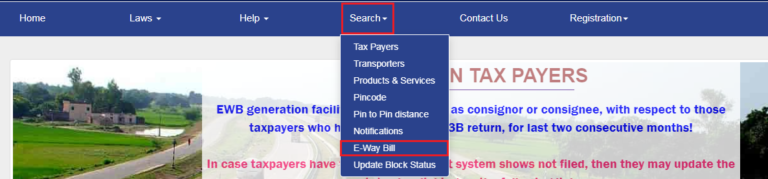
Use this when you are quoting freight, planning a dispatch, or checking a bill someone else made. The public search on the E-Way Bill home page needs no username or OTP. The path below is from NIC’s release note on the feature; the page layout may look slightly different today, but the menu name has stayed the same.
What you need before you start
- The 6-digit PIN code of the place the goods will be dispatched from (your godown or factory, not always your billing address)
- The 6-digit PIN code of the place they will be delivered to (the Ship To address)
- A browser on a computer or phone. No login is needed
Step 1. Open the official home page
Go to ewaybillgst.gov.in. Type the address yourself rather than clicking a search ad, since look-alike sites exist.
Step 2. Open the distance search
Hover on or tap Search in the top menu and pick PIN to PIN Distance.
Step 3. Enter both PIN codes
Fill the Dispatch From PIN code and the Ship To PIN code, complete any check the page asks for, and submit.
Step 4. Note the figure and the 10% ceiling
The page shows the approximate distance in km. Multiply it by 1.1 and round down: that is the highest figure the portal will take for this pair at the time of generation. Write both numbers on the dispatch note so the person generating the bill uses the same figure.
Entering the distance while you generate the bill
The full generation process is on our step-by-step guide to generating an e-way bill. This part only covers the distance field, which sits in Part A after the address details.
Step 1. Fill the PIN codes first
Enter the dispatch and delivery addresses with their PIN codes. If the goods leave from a different place than your registered address, or go to a different place than the buyer’s billing address, fill the Dispatch From or Ship To details so the right PIN codes are used.
Step 2. Read the distance the portal fills in
Once both PIN codes are in, the approximate distance appears in the distance field. Check it against what your transporter expects for the trip.
Step 3. Change it only if the real route is longer
A closed road, a toll-free bypass or a drop through the transporter’s hub can make the trip longer. You can raise the figure by up to 10%. Keep a note of the reason, such as the transporter’s route sheet.
Step 4. Check the validity date before you submit
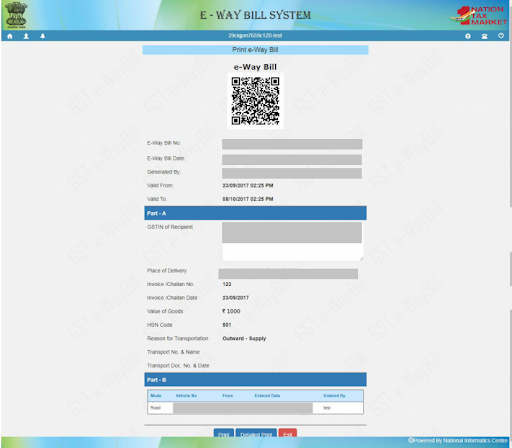
After you submit, the bill shows its “valid until” date. Check it once before printing. If the date looks too short for the trip, the distance or the PIN code is usually the reason.
One case does not need vehicle details at all: a movement of under 50 km within the same state from your place to the transporter’s place. That rule, and how validity is counted, are covered on our e-way bill limit, rules and validity page.
Which PIN codes to use in tricky cases
Most wrong distances come from the wrong pair of PIN codes, not from typing the wrong number of km. These are the cases that cause the most confusion at the billing desk:
| Case | Distance should run between |
|---|---|
| Bill-to and ship-to are different (goods go to the buyer’s customer or site) | The dispatch PIN code and the actual Ship To PIN code, not the buyer’s billing PIN |
| Goods leave from a branch or job worker, not your registered office | The Dispatch From PIN code and the delivery PIN code |
| Export by sea or air | The dispatch PIN code and the PIN code of the port, airport or border check post. The official FAQ says the Ship To address and PIN code should be that location |
| Import | The PIN code of the port, airport or border check post and the delivery PIN code |
| Delivery inside the same PIN code area | The same PIN code twice. The portal caps the distance at 100 km |
| Extending a bill during the trip | The current place of the vehicle and the destination. The extension form asks for the approximate distance still to travel |
How distance changes the validity date
Validity for normal cargo is one day for every 200 km or part of it, so the distance you submit decides how many days you get. The full slab table, the over-dimensional cargo rule and the midnight rule are on our e-way bill validity rules. What matters here is how close your figure is to a 200 km boundary.
Say the portal shows 390 km between your Ahmedabad godown and a buyer’s site. That gives 2 days. Your transporter’s route through a hub is really 415 km, which is within the 10% limit (429 km). Entering 415 km pushes the trip past 400 km and gives 3 days. That is fine when the longer route is real and you can show it.
Do not stretch the distance just to get an extra day. If an officer stops the vehicle, the distance and PIN codes are compared with the documents. CBIC Circular 64/38/2018-GST treats a wrong PIN code as a minor error only when the address is correct and the mistake does not increase the validity period. Outside that, the case can move to the stricter penalty route explained on our e-way bill penalty page.
Entered the wrong distance? Here is what to do
A generated e-way bill cannot be edited. The official FAQ says the only fix for a wrong entry in Part A is to cancel the bill and generate a new one, and cancellation is allowed within 24 hours of generation. The cancel steps are on our e-way bill management guide. Once you have the new bill, you can confirm its details through the e-way bill status check.
If it does not work
| What you see | What to try |
|---|---|
| The distance field stays blank after both PIN codes are in | The PIN pair may not be in the database. Enter the real road distance yourself and keep the route proof |
| Your figure is not accepted | It is more than 10% above the portal’s figure. Re-check the PIN codes first; if they are right, enter a figure within the limit |
| “INVALID PIN CODE” alert | Re-check the PIN with India Post or the buyer. A genuinely new PIN can still be used, but the bill is flagged for the department to review |
| Same PIN code, but the trip is longer than 100 km | Check whether one address really has a different PIN code. Many towns have several |
| Validity shorter than the trip needs | The distance is probably understated. If the bill is under 24 hours old, cancel and regenerate; if not, plan an extension before it expires |
| The PIN to PIN search page will not open | The portal may be slow. See our portal not working guide for what to check |
E-way bill distance FAQs
Is the e-way bill distance the same as the Google Maps distance?
Not always. The portal uses its own PIN-to-PIN road database, which NIC describes as an approximate motorable distance. Your exact route can be shorter or longer, and the portal lets you go up to 10% above its figure.
Can I enter less distance than the portal shows?
The official FAQ only talks about entering a higher figure within 10%. NIC’s API rules also reject a figure that differs from the database distance by more than 10% either way. In practice, use the portal’s figure unless the real route is longer.
What is the maximum distance allowed in an e-way bill?
NIC’s API documentation describes the distance field as less than 4,000 km. For delivery within the same PIN code area, the limit is 100 km.
Can I change the distance after the e-way bill is generated?
No. Part A cannot be edited. Cancel the bill within 24 hours of generation and make a new one with the right distance. Updating Part B does not change the distance.
Which PIN code is used when the goods go to a different place than the buyer’s address?
The Ship To PIN code, where the goods are actually delivered. The distance runs from the Dispatch From PIN code to that place.
Found this useful? Share it with your accounts team.
Related E-Way Bill guides
Distance sorted? These guides cover the rules and steps that come right before and after it.
Rules
E-Way Bill Limit, Rules and Validity
When a bill is needed, the ₹50,000 test, exemptions and how many days each distance slab gets.
Step by step
How to Generate an E-Way Bill
Fill Part A and Part B, add HSN and transport details, and get your e-way bill number.
After generation
E-Way Bill Management
Update Part B, extend validity, cancel within 24 hours or reject a bill raised on you.
-
E-Way Bill Limit in Maharashtra: ₹1 Lakh Rule and Exemptions
Read the guide →: E-Way Bill Limit in Maharashtra: ₹1 Lakh Rule and ExemptionsMaharashtra needs an e-way bill inside the state only above ₹1 lakh, with no separate city limit, and goods going…
-

E-Way Bill Limit in Rajasthan: ₹50,000, ₹1 Lakh or ₹2 Lakh?
Read the guide →: E-Way Bill Limit in Rajasthan: ₹50,000, ₹1 Lakh or ₹2 Lakh?Rajasthan has three e-way bill limits: ₹50,000 for goods crossing the state border, ₹1 lakh within the state and ₹2…
-
How to Cancel an E-Way Bill: 24-Hour Rule and Steps
Read the guide →: How to Cancel an E-Way Bill: 24-Hour Rule and StepsCancel an e-way bill within 24 hours of generation from the login that made it: see how the clock runs,…
ewaybillinfo.com
Independent guides to E-Way Bill login, registration, generation, management, limits, penalties and latest updates. Always use the official government portal for account actions.
Guides
Official portals
© 2026 ewaybillinfo.com. All rights reserved.
Independent informational website. ewaybillinfo.com is not affiliated with, endorsed by, or operated by the Government of India, GSTN, NIC, CBIC, or the official E-Way Bill portal. Information on this site is provided for general guidance and may change as government rules, portal features, or procedures are updated. Always verify important details on the official government portal before taking action. We never ask for your E-Way Bill password, OTP, login credentials, or other sensitive account information.