
● Independent guide · Registration access
E-Way Bill Registration: Get the Right Portal Access Without Setup Confusion
Your eWay Bill registration route depends on whether you have a GSTIN and the type of access you need. GST-registered taxpayers and transporters register with their GSTIN. A transporter or trader without GST registration enrols through the relevant route instead. Staff who need access get a sub-user account from the main user rather than registering separately.
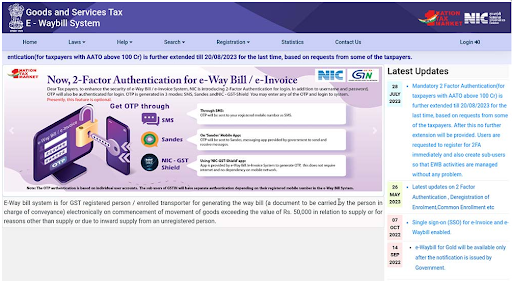
Official E-Way Bill portal registration options. Menu labels may change as the portal is updated.
This is an independent informational website, not a government portal. We never ask for your password or OTP. Use the official E-Way Bill portal at ewaybillgst.gov.in.
In This Guide
Which E-Way Bill Registration Route Applies to You?
Start your eway bill registration by finding the route that matches your situation below. The portal separates these options, so choosing the right eway bill portal registration route first can save you from starting with the wrong form or account type.
| Your situation | GSTIN? | Route | What you receive/do |
|---|---|---|---|
| GST-registered business (supplier or recipient) | Yes | Register with your GSTIN | Your own username and password |
| GST-registered transporter | Yes | Register with your GSTIN, then update your profile as a transporter | Your GSTIN identifies you as the transporter |
| Transporter without GST registration | No | Transporter enrolment (FORM GST ENR-01) | A 15-digit Transporter ID (TRANSIN) and login details |
| Unregistered person or dealer moving goods | No | FORM GST ENR-03 enrolment | A 15-character Enrolment ID used in place of a GSTIN |
| Staff member or branch operator | Not applicable | Sub-user created by the main user | A sub-user ID with limited permissions |
Not sure you need an e-Way Bill at all? Check E-Way Bill rules, limits and validity.
What to Keep Ready Before You Start
For GSTIN registration
- Your 15-digit GSTIN
- The phone with your registered mobile number (the one on your GST record), for the OTP
- The username you want to use
For transporter or ENR-03 enrolment
- PAN of the business or person
- A working mobile number
- Legal name, business type and address details
- Keep any supporting details or documents requested by the current portal form ready.
You do not need your GST portal password for any of these routes.
How to Register on the E-Way Bill Portal With Your GSTIN
The e-way bill registration process for GSTIN holders is a one-time step, even if you already use gst.gov.in. To register on e-way bill portal, use your GSTIN and create separate login credentials for this portal.
Registration steps
- Go to ewaybillgst.gov.in. Close the login box if it opens.
- Open the Registration menu and choose eWay Bill Registration.
- Enter your GSTIN and the captcha, then continue.
- Check the details the portal pulls from your GST record: name, trade name, address, mobile number and e-mail.
- Send the OTP to your registered mobile number and verify it.
- Create your username and password, then submit.
- The portal confirms your account once it validates the entries.
Choosing a username and password
The username is your own choice. It is not your GSTIN, and it is not your GST portal login ID. Pick a name your team will recognise and set a strong password. Follow the length and character rules shown on the form.
If your name, address or mobile number looks wrong
Click Update from GST Common Portal to pull the latest details from your GST record. If they are still wrong, the GST record itself needs an amendment on gst.gov.in before you continue.
Transporter Registration, Enrolment and TRANSIN
GST-registered transporters
If your transport business has a GSTIN, register with it using the steps above. Your GSTIN then identifies you as the transporter on e-Way Bills, so you do not need a separate Transporter ID. The portal also lets a registered taxpayer update the profile to act as a transporter.
Do not use transporter enrolment. A PAN already linked to a GSTIN fails validation there, and the official FAQ directs these users to the GSTIN route.
Transporters not registered under GST (FORM GST ENR-01)
For e-way bill registration for transporter without a GSTIN, complete eway bill enrolment instead of GSTIN registration.
- On the official portal, open Registration and choose Enrolment for Transporters.
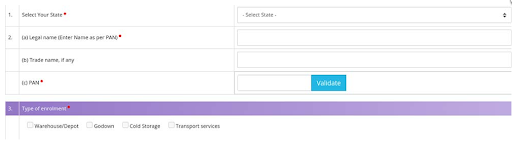
- Select your state, enter your legal name as per PAN, and validate the PAN.
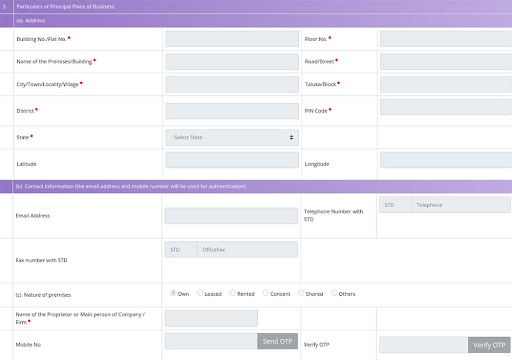
- Add your business type, constitution and address details.
- Create your username and password, then submit the form.
- Note the Transporter ID shown when enrolment is complete.

What TRANSIN is and how shippers use it
TRANSIN is the 15-digit Transporter ID that the E-Way Bill System issues to a transporter with no GSTIN. That also answers how to get transporter ID as an unregistered transporter: enrol once, and the number is issued at the end.
Share the number with the businesses you carry goods for. When a supplier enters it in the transport details of an e-Way Bill, that e-Way Bill is assigned to you. You can then update Part B, which holds the vehicle details. See how to update vehicle details on an e-Way Bill
Enrolled already? eway bill transporter login is covered in our E-Way Bill login guide.
Not Registered Under GST? Enrolling Through Form ENR-03
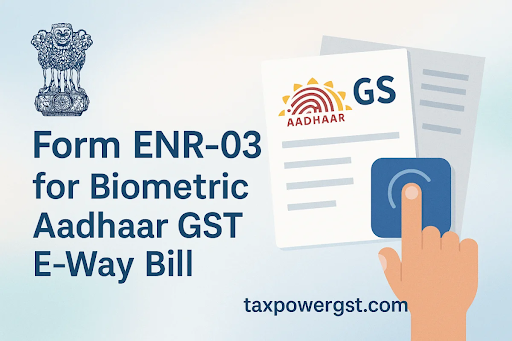
Since 11 February 2025, an unregistered supplier or dealer who needs to move goods can enrol through FORM GST ENR-03. This is e-way bill enrolment for unregistered persons, provided for under CGST Rule 138(3).
The ENR-03 option sits under the Registration menu. You select your state, verify your PAN, add your address and confirm your mobile number by OTP. Then you create a username and password. The portal issues a 15-character Enrolment ID, which you use in place of a GSTIN.
Whether you must, or only may, generate an e-Way Bill depends on your situation. See E-Way Bill rules and limits and recent portal changes.
After Registration: Your First Login
Once eway bill registration is complete, log in with your new username and password. The portal also asks for an OTP because two-factor authentication (2FA) now applies to all users. The OTP can come by SMS or through the Sandes or NIC-GST-Shield apps. The second portal, ewaybill2.gst.gov.in, accepts the same credentials.
See our E-Way Bill login guide. For OTP issues, see fixing OTP and login problems. After login, you can generate your first e-Way Bill.
Creating and Managing Sub-Users
Why sub-users, and how many you can create
Sub-users let staff and branches work on the portal without knowing the main username and password. Each action can then be traced to a named person. If you’re checking how many sub users in e-way bill accounts are allowed, the official FAQ sets a limit of 10 for each principal or additional place of business. A business with one principal place and three additional places can create up to 40. Some older guides still quote 3.
Steps to create a sub-user
The main user can create sub-user in e-way bill access from the dashboard:
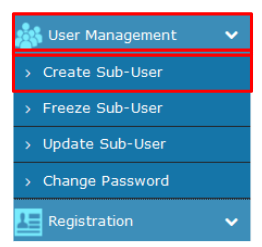
- Log in as the main user and open User Management > Create Sub-User.
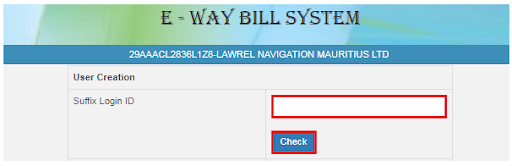
- Verify the OTP sent to your registered mobile number.

- Enter a suffix to build the sub-user’s username.
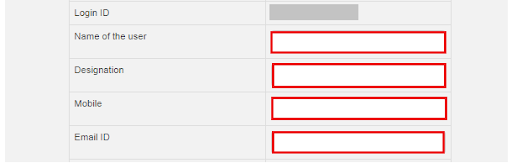
- Add the staff member’s name, mobile number and e-mail.
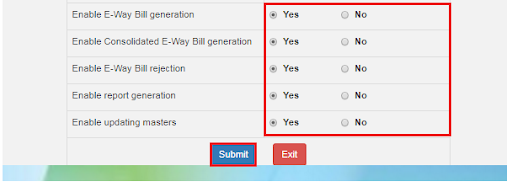
- Choose the place(s) of business and permissions, then submit.

Permissions and freezing access
Give each sub-user only the tasks they need, such as generating e-Way Bills or viewing reports. If a staff member leaves or changes roles, use Freeze Sub-User to block their access. Staff sign in through eway bill sub user login, explained in our E-Way Bill login guide.
Common Registration Problems and Fixes
Most eway bill registration problems come from choosing the wrong route or from outdated GST details. Match the message you see to the fix below.
| Problem | Likely reason | What to do |
|---|---|---|
| Portal says the GSTIN is already registered | You or a colleague registered earlier | If you’re already registered on e-way bill portal, use the existing credentials or recover them through the guide below. |
| Already enrolled as a transporter | Enrolment with this PAN was done before | Use the existing username and password. |
| PAN not validated during transporter enrolment | The PAN is linked to a GSTIN | Register with the GSTIN instead. |
| Auto-filled details are wrong | The GST record shown is outdated | Click Update from GST Common Portal. If still wrong, amend the record on gst.gov.in. |
| OTP not received | Mobile number or delivery issue | See fixing OTP and account recovery |
| Forgotten username or password | Credentials not saved | Use the recovery options in the same guide. |

Getting Official Help
For problems tied to your account, use the helpdesk and grievance contacts on the official portal’s Contact Us page. The E-Way Bill System is run by the National Informatics Centre (NIC). Take contact details only from the portal.
E-Way Bill Registration FAQs
Do I need to register on the e-Way Bill portal if I already have GST registration?
Yes. GST registration and E-Way Bill access are separate. A GST-registered person completes eway bill registration once on ewaybillgst.gov.in with the GSTIN before generating e-Way Bills.
Can I use my GST portal username and password on the E-Way Bill portal?
No. You create a separate username and password during registration. Your GSTIN links the two systems, but the login details do not carry over.
Can an unregistered transporter generate an e-Way Bill?
Yes, after enrolling through FORM GST ENR-01. The portal issues a Transporter ID and login details, which the transporter uses to work on e-Way Bills for clients.
Is EWay Bill Registration free?
Registration is done directly on the official portal, and the portal’s own forms show whether any fee applies. Be careful with third parties that ask for payment or your OTP to register you.
Do the same credentials work on ewaybill2.gst.gov.in?
The E-Way Bill 2.0 portal accepts the same username and password used on ewaybillgst.gov.in. Complete the OTP/2FA step when prompted. Use only these .gov.in addresses.
I changed my mobile number on the GST portal, what now?
OTPs go to the mobile number on your GST record. Update that record first, then use Update from GST Common Portal so the E-Way Bill System picks up the new number.
Last updated: 10 October 2026 · Information verified: 10 October 2026
This independent guide is based on official E-Way Bill System, GSTN and CBIC resources. Complete every registration step on the official government portal.
ewaybillinfo.com
Independent guides to E-Way Bill login, registration, generation, management, limits, penalties and latest updates. Always use the official government portal for account actions.
Guides
Official portals
© 2026 ewaybillinfo.com. All rights reserved.
Independent informational website. ewaybillinfo.com is not affiliated with, endorsed by, or operated by the Government of India, GSTN, NIC, CBIC, or the official E-Way Bill portal. Information on this site is provided for general guidance and may change as government rules, portal features, or procedures are updated. Always verify important details on the official government portal before taking action. We never ask for your E-Way Bill password, OTP, login credentials, or other sensitive account information.