
● Independent guide · Last checked: 01-Oct
E-Way Bill Login: Official Portal Links and Step-by-Step Help
Every eway bill login happens on the official E-Way Bill portal, run by the National Informatics Centre (NIC). The main site is E-Way Bill 1.0 at ewaybillgst.gov.in. E-Way Bill 2.0 uses the existing E-Way Bill username and password, and supported transactions are synchronized with the primary portal.
Main official portal
Open the E-Way Bill portal — ewaybillgst.gov.in →
Use this if the main portal is unavailable
Main portal down? Open E-Way Bill 2.0 — ewaybill2.gst.gov.in →
Independent guide: this website is not the government portal and is not run by GSTN, NIC or the Government of India. We never ask for your password or OTP. Enter them only through the official ewaybillgst.gov.in login or E-Way Bill 2.0.
Jump to: Login steps · Which portal? · OTP and 2FA · Which login is mine? · Can’t log in? · After login
Before You Log In: What You Need
A quick check can help avoid a failed eway bill gst login attempt. Keep these four things ready:
1
Your username (User ID) and password for the E-Way Bill portal. These are created during E-Way Bill registration.
2
Your OTP method: the registered mobile number for SMS, or the Sandes or NIC-GST-Shield app if you have set one up.
3
The correct address: ewaybillgst.gov.in or ewaybill2.gst.gov.in. Type it yourself or use the official links above.
4
A current browser on a device you trust. Avoid shared or public computers to protect your account.
How to Log In to the E-Way Bill Portal
If you need to know how to login e way bill portal, start with the main official site. The steps apply to taxpayers, transporters and sub-users alike; only the account details change. Follow this e way bill login step by step, and stop if anything on screen looks wrong.

01
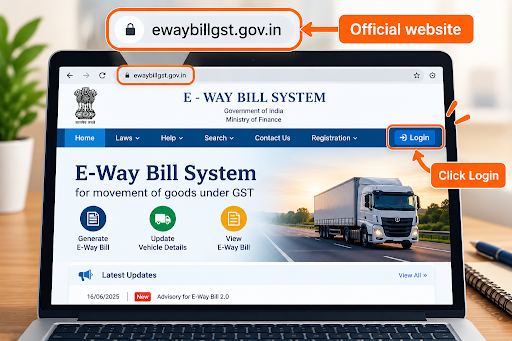
Open the official portal. Type ewaybillgst.gov.in into your browser, or use the official link at the top of this page. Check the address bar before going further.
02
Go to the eway bill login page. Select Login on the portal’s homepage.
03
Enter your username, password and captcha. Type the captcha exactly as shown. If the characters are hard to read, refresh the captcha before typing.
04
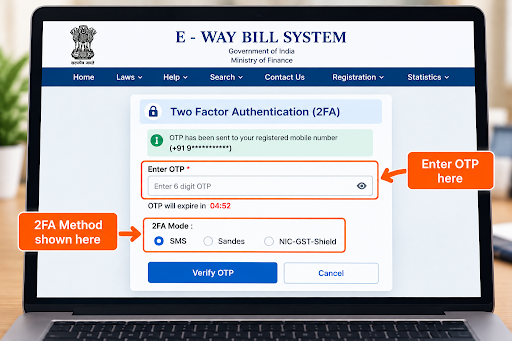
Confirm with your OTP. Enter the one-time password from SMS, the Sandes app or the NIC-GST-Shield app, depending on the 2FA method set up for your account.
05
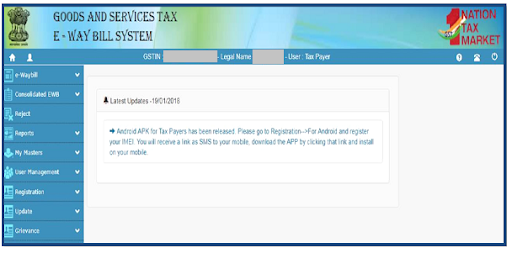
Check that you have reached the dashboard. After a successful eway bill system login, the dashboard shows your account details and the main menu.
The e way bill login on E-Way Bill 2.0 is expected to follow the same sequence. If your eway bill login stops at step 3 or 4, go to Can’t Log In? Find Your Problem or our full guide: E-Way Bill Login Not Working .
Which E-Way Bill Portal Should You Use? 1.0 vs 2.0
Both portals are official and developed by NIC. GSTN announced E-Way Bill 2.0 in Advisory No. 611 (16 June 2025). It went live on 1 July 2025 so that taxpayers and transporters can keep working when the main portal has problems.
| Your situation | What to use | Official domain |
|---|---|---|
| Main portal is working | E-Way Bill 1.0, the standard eway bill portal login | ewaybillgst.gov.in |
| Main portal is slow or unavailable | E-Way Bill 2.0, via the ewaybill2.gst.gov.in login | ewaybill2.gst.gov.in |
| A message or website sends you to any other address | Neither. Close it and type one of the two official addresses yourself. | — |
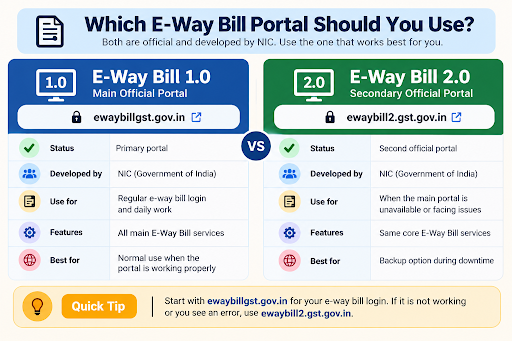
According to the advisory, data syncs between the two portals, so key actions such as extending validity or updating transporter details can be done on either one. If you plan to use e way bill 2.0 login with your usual credentials, confirm that they work there.
For a fuller comparison, see E-Way Bill 1.0 vs 2.0. If the main portal is down right now, see Portal Down.
OTP and Two-Factor Authentication at Login
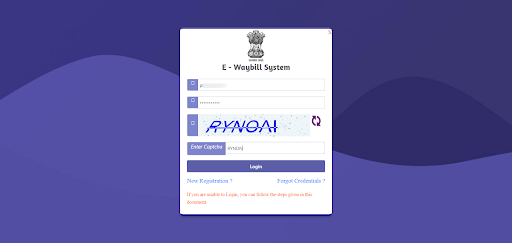
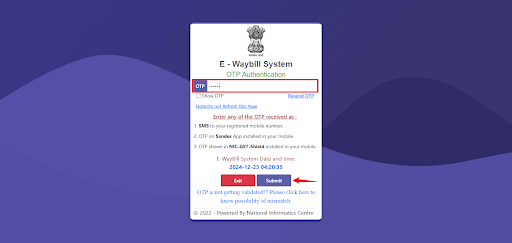
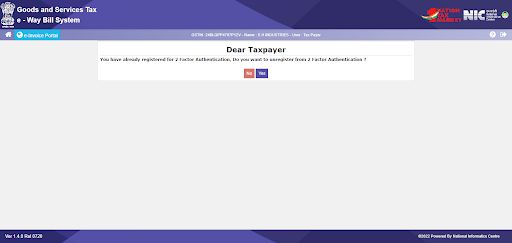
After your password and captcha, every eway bill login needs a second check: a one-time password (OTP). This is two-factor authentication (2FA), also called multi-factor authentication (MFA). A GSTN advisory dated 17 December 2024 phased it in by business size, with all taxpayers and users covered from 1 April 2025.
| OTP method | How the OTP reaches you | Good to know |
|---|---|---|
| SMS | Sent to your registered mobile number | Needs mobile signal |
| Sandes app | Government messaging app on your registered mobile | Needs an internet connection |
| NIC-GST-Shield app | Shown inside the app and refreshed every 30 seconds | Works without internet or signal. The phone’s time must match the portal’s time. Download it only through the portal’s 2-Factor Authentication menu. |
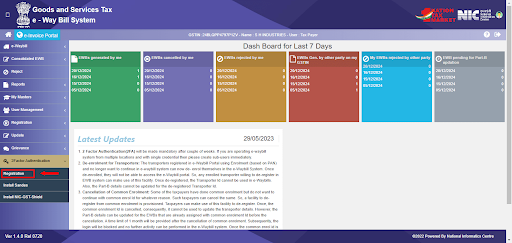
Under e way bill 2 factor authentication, each user is verified separately. A sub-user receives the OTP on the mobile number registered for their own account, not the main user’s.
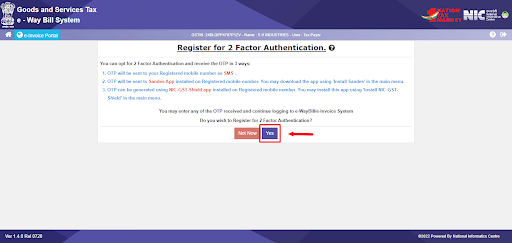
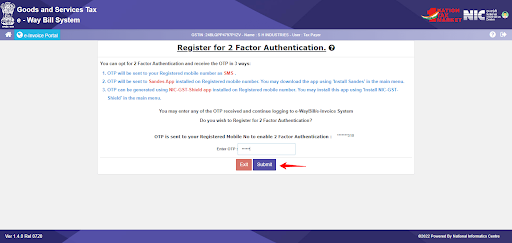
The same 2FA covers the e-Invoice system, but not the GST common portal.
Which Login Is Yours? Taxpayer, Transporter, Sub-User or Citizen
The portal has several types of users, and each signs in with different account details. Find your row before you try to log in.
| Who you are | What access applies | Identifier / account | Where to go next |
|---|---|---|---|
| GST-registered taxpayer (supplier or recipient) | Main user account; the standard gst eway bill login | Username and password created at registration with your GSTIN | Official portal. New user? See Registration & User Access |
| Transporter | e way bill transporter login with your own account | Registered under GST: GSTIN-based account. Not registered: 15-digit Transporter ID (TRANSIN) after enrolment | Official portal. For the ID, see TRANSIN guide |
| Staff member (sub-user) | e way bill sub user login, set up by your main user | Your own username; OTP goes to your own registered mobile | Ask your main user for access. See Registration & User Access |
| Citizen or unregistered person | A separate citizen route on the portal | Details issued through that route | Official portal’s Registration menu |
The e way bill login for transporter without GSTIN starts with enrolment, not with the login screen. This section explains what a Transporter ID is and how it is issued.
New to the Portal? Register Before Your First Login
You need an account before you can sign in. GST-registered taxpayers register with their GSTIN: an OTP goes to the mobile number in their GST registration, and they then create a username and password. Transporters without a GSTIN go through enrolment instead.
Full steps: E-Way Bill registration and enrolment for transporters.
Can’t Log In? Find Your Problem
A failed eway bill login usually fits one of the patterns below. Match what you see on screen, then follow the link for the full fix.
| What you see | Likely reason | Next step |
|---|---|---|
| Captcha rejected | Characters mistyped, or the captcha expired before you submitted | Refresh the captcha and type it again. Still failing? See captcha & browser fixes |
| “Invalid username or password” | Wrong or forgotten credentials, or details from another portal | Use the account-recovery option on the official login page. See E-Way Bill forgot password |
| OTP does not arrive | Delayed SMS, weak signal, or an outdated registered mobile number | Try the Sandes or NIC-GST-Shield app if already set up. See E-Way Bill OTP not received |
| Account shown as frozen or inactive | A restriction on the account itself | See account frozen or GSTIN blocked |
| You can log in but cannot generate e-way bills | Your GSTIN may be blocked under applicable compliance rules | See E-Way Bill penalty & blocked GSTIN |
| An error message you don’t recognise | A portal validation or system error | Note the exact message. See Error Codes |
| Portal won’t load or keeps timing out | The main portal may be unavailable or overloaded | Try E-Way Bill 2.0. See E-Way Bill portal down today |
Not listed here? Read the full guide: E-Way Bill login not working: OTP, password & account recovery.
What You Can Do After Logging In
After a successful eway bill login, the dashboard menu leads to your everyday tasks. Each one has its own guide.
Generate an e-way bill
fill in Part A (invoice and goods) and Part B (transport). Step-by-step guide
Update the vehicle number
change Part B when the vehicle changes.
Extend validity
when goods cannot arrive in time. Manage an E-Way Bill
Cancel or reject
within the time limits the rules allow.
get a paper copy of an e-way bill.
Reports
view e-way bills generated for you or by you. Manage an E-Way Bill
Recent Changes That Affect Your Login and E-Way Bills
30 July 2026: Proposed E-Way Bill changes relating to mandatory Ship-To GSTIN and EWB Closure were kept on hold; check the Latest Updates page before relying on older implementation dates. Last checked:
1 July 2025: E-Way Bill 2.0 went live at ewaybill2.gst.gov.in as a second official portal (GSTN Advisory No. 611, 16 June 2025).
1 April 2025: 2FA became mandatory for all taxpayers and users (GSTN advisory, 17 December 2024).
1 January 2025: E-way bills can no longer be generated for documents older than 180 days, and total validity extensions are capped at 360 days from generation (GSTN advisory, December 2024).
Rules at a glance: Under Rule 138 of the CGST Rules, an e-way bill is generally needed when consignment value exceeds ₹50,000, and validity depends on distance. Some states set different limits for movement within the state. Details: E-Way Bill limit, rules & validity. All changes: E-Way Bill latest updates.
Stay Safe: How to Spot a Fake E-Way Bill Site
Look-alike websites, phishing pages and fake apps may try to collect portal passwords and OTPs. Three checks can help protect your account:
Check the domain. The official portals are ewaybillgst.gov.in and ewaybill2.gst.gov.in. Read the full address before typing anything; a similar name on a different domain is not official.
Never share your OTP or password with a caller, a chat contact or any website other than the official E-Way Bill portal. This site will never ask for them.
Reach apps and resources through official routes. For example, the NIC-GST-Shield app is available only through the official portal’s 2-Factor Authentication menu.
More warning signs: how to spot a fake portal
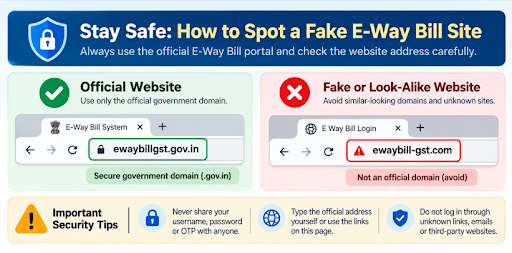
More warning signs: how to spot a fake portal
Official Help and Support
Some account problems can only be solved through the official system. For those, use the official helpdesk resources on ewaybillgst.gov.in, including the Contact Us page, user manuals and FAQs.
This website is independent. We cannot access, unlock or repair your government portal account.
E-Way Bill Login FAQs
Is this website the government E-Way Bill portal?
No. This is an independent guide. It is not run by GSTN, NIC or the Government of India, and it cannot sign you in or see your account. To sign in, use the official links at the top of this page. We will never ask for your password or OTP.
What is the official website for E-Way Bill login?
The e way bill official website is ewaybillgst.gov.in, developed and run by NIC. E-Way Bill 2.0 at ewaybill2.gst.gov.in is also official and works as a second portal when the main one is unavailable. Check the full address before you enter any details.
Is ewaybill2.gst.gov.in an official website?
Yes. GSTN announced it in Advisory No. 611 (16 June 2025) as the E-Way Bill 2.0 portal, developed by NIC and live from 1 July 2025. According to the advisory, data syncs with the main portal, allowing it to serve as a second official route when needed.
Can I log in to the E-Way Bill portal without OTP?
No. Two-factor authentication has been mandatory for all taxpayers and transporters since 1 April 2025. After username, password and captcha, authentication can be completed through SMS, Sandes or NIC-GST-Shield.
Is the E-Way Bill login the same as the GST portal login?
No. The E-Way Bill portal uses its own username and password, created when you register on it with your GSTIN. Its 2FA requirement also applies to the E-Way Bill and e-Invoice systems, not to the GST common portal.
How does a transporter without GSTIN log in?
They first enrol as a transporter on the official portal and receive a 15-digit Transporter ID (TRANSIN). They then use the account details set up during enrolment. TRANSIN guide, how the Transporter ID works, explains the ID.
Why is my E-Way Bill login not working?
A failed eway bill login can involve a mistyped captcha, wrong credentials, a delayed OTP, an account restriction or portal downtime. Match what you see in the problem finder above.
ewaybillinfo.com
Independent guides to E-Way Bill login, registration, generation, management, limits, penalties and latest updates. Always use the official government portal for account actions.
Guides
Official portals
© 2026 ewaybillinfo.com. All rights reserved.
Independent informational website. ewaybillinfo.com is not affiliated with, endorsed by, or operated by the Government of India, GSTN, NIC, CBIC, or the official E-Way Bill portal. Information on this site is provided for general guidance and may change as government rules, portal features, or procedures are updated. Always verify important details on the official government portal before taking action. We never ask for your E-Way Bill password, OTP, login credentials, or other sensitive account information.