
● Independent troubleshooting guide
E-Way Bill Login or Portal Not Working? Fix Invalid Login, Password and Portal Errors
Quick Answer: Most cases of e-way bill login not working come down to an “Invalid login credentials” error, an old browser cache, a captcha or page that will not load, a frozen account, or the portal itself being down. Match what you see in the problem-finder table below. If the main portal is down, try the official E-Way Bill 2.0 portal at ewaybill2.gst.gov.in with the same username and password. Still stuck? Call the GST helpdesk on 1800-103-4786 (toll free).
For your security, complete all login and account-recovery steps through the official E-Way Bill portal. We do not ask for your password, OTP, or other login credentials.
In This Guide
Find Your E-Way Bill Login Problem
Start with the message or problem you see on screen. Match your eway bill login problem to the closest row, then use the full-fix section for the next steps. If you only need the normal sign-in process, see the E-Way Bill login steps.
| What you see | Likely cause | Try this first | Full fix |
|---|---|---|---|
| “Invalid login” | Incorrect username or password | Clear the browser cache, then retype | Invalid login credentials |
| Username or Transporter ID forgotten | Lost credentials | Use the recovery option on the login page | Forgot username or password |
| OTP not received | Delivery or registered-mobile issue | Turn off DND and check the registered number | OTP not received guide |
| OTP rejected | Old or expired code | Enter only the latest OTP | OTP not received guide |
| Invalid captcha or page not loading | Browser, cache, or session issue | Refresh the captcha or page | Captcha/browser problems |
| Account shown as frozen | GSTIN or account-status issue | Check the current GSTIN status | Account frozen |
| Login works but generation fails | GSTIN may be blocked | Check the blocking status | GSTIN blocked |
| Portal unavailable | Downtime or maintenance | Check official portal notices | Portal down |
| Sub-user OTP issue | Sub-user account/mobile details | Ask the main user to check the registered details | Sub-user problems |
“Invalid Login Credentials” Error on the E-Way Bill Portal
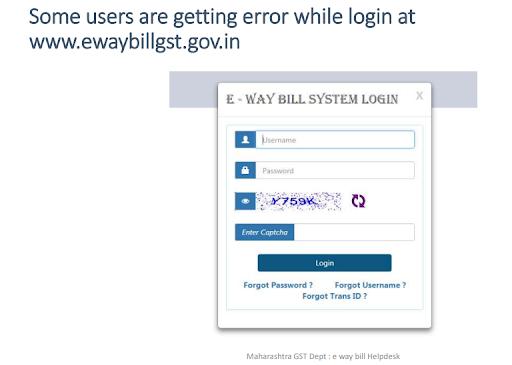
This is the message people see most often on the E-Way Bill login page, and it does not always mean your password is wrong. The official E-Way Bill system’s own help note for this error says that if you face the login problem repeatedly, you should clear the browser cache and continue. So start with the cache, then check what you typed.
Step 1. Clear the browser cache
Press Ctrl + Shift + Delete in Chrome, Edge or Firefox. Set the time range to All time, tick cookies and cached images and files, and clear. Close the browser completely, open it again and go to the login page.
Step 2. Type the username and password yourself
Do not rely on a saved or auto-filled password, which may be an old one. Check that Caps Lock is off and that no space has slipped in at the start or end. Remember that the E-Way Bill portal has its own username and password; your GST portal login will not work here.
Step 3. Seeing it inside Tally, Marg or other software?
When the error appears while generating an e-way bill from accounting software, it usually means the e-way bill username or password saved in that software does not match. Correct the details in the software’s e-way bill login or settings screen and try again.
Step 4. Still failing? Reset or check the account
Use Forgot Password or Forgot Username on the official login page (steps in forgot username or password). If your details are right and the error continues, check whether the account is frozen.
Tip: keep one E-Way Bill tab open while logging in, and consider keeping a separate browser only for government portals. Old session data from another tab is a common reason for repeat errors. The official help notes are on docs.ewaybillgst.gov.in.
Stuck at the OTP Step?
Every E-Way Bill login now needs an OTP after the password and captcha. If the code does not arrive, goes to an old mobile number or gets rejected, follow our separate step-by-step guide: E-Way Bill OTP not received: causes and fixes.
The quick checks: turn off DND on the registered mobile, wait a couple of minutes before asking for a new code, enter only the latest code, and keep the phone’s date and time on automatic if you use the NIC-GST-Shield app. A sub-user gets the OTP on the number saved for that sub-user, not on the main user’s phone.
Forgot Your E-Way Bill Username or Password?
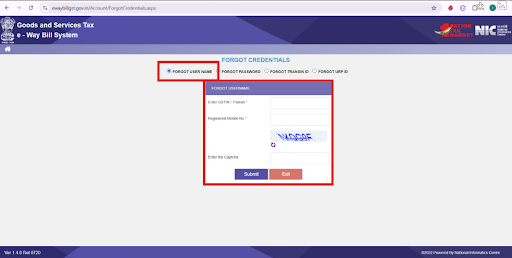
If eway bill forgot password is your issue, use the recovery option on the official E-Way Bill login page rather than creating another account. Forgot Username and Forgot Password handle different problems, while enrolled transporters may have a separate Forgot Trans id option for recovering their Transporter ID.
Forgot Username or Transporter ID
For eway bill forgot username recovery:
- Open the official E-Way Bill login page.
- Select Forgot Username.
- Enter the account details requested by the portal.
- Complete the portal’s identity-verification process and follow the recovery instructions.
- If you are an enrolled transporter and have lost your Transporter ID (TRANSIN), look for the Forgot Trans id recovery option.
Reset Your Password
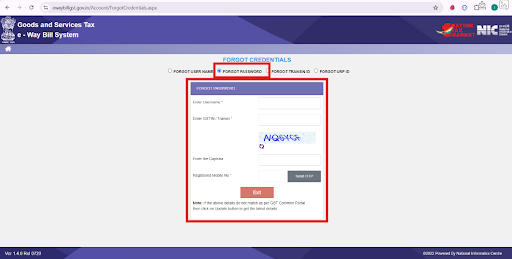
For a password reset:
- Select Forgot Password on the login page.
- Enter the requested account details.
- Complete the required OTP verification using your registered mobile number.
- Follow the portal prompts to set a new password.
Registered Mobile Number Changed
An eway bill registered mobile number change may require you to correct the registered number through the GST Common Portal before the updated details can be used by the E-Way Bill System.
Check the mobile number associated with your GSTIN first. If it needs changing, complete the appropriate amendment through the GST Common Portal rather than trying to change GST registration details through this troubleshooting page.
After the GST record is updated, return to the E-Way Bill portal and retry login or account recovery. If the portal still shows outdated details, use the official helpdesk or grievance route.
Captcha Error, Page Not Loading or Not Opening in Chrome
An eway bill invalid captcha message can appear when the entered code is not accepted or the browser session has a problem. Try these basic checks before assuming there is an issue with your account:
- Refresh the captcha and enter the new code carefully.
- Keep one E-Way Bill portal tab open while attempting to log in.
- Clear the browser cache and cookies, then reload the login page.
- Use a current, updated browser.
- Check your internet connection and reload the page if the session stops responding.
- If needed, close the browser and start a fresh session before trying again.
- If the captcha or login page continues to fail after these checks, the problem may be with the portal rather than your credentials.
E-Way Bill Portal Not Opening in Chrome
If the portal opens on another device but not in Chrome on your computer, the cause is almost always on the browser side. Work through these in order:
- Clear Chrome’s data: Settings > Privacy and security > Delete browsing data (called Clear browsing data in older versions). Choose All time, tick cookies and cached files, and clear.
- Try an Incognito window (Ctrl + Shift + N). If the portal opens there, an extension or old data in your normal window is the problem. Turn off extensions one by one, starting with ad blockers.
- Update Chrome from Settings > About Chrome, then restart the browser.
- Try another browser such as Edge or Firefox to rule out a Chrome-only problem.
- If you see “This site can’t be reached” in every browser and on another network too, the portal itself is probably down. See portal down or slow.
E-Way Bill Account Frozen or GSTIN Blocked
A frozen account and blocked E-Way Bill generation are not the same problem. A frozen account can prevent portal access, while GSTIN blocking can affect your ability to generate an E-Way Bill even when login still works.
| Problem | Can you log in? | What to check |
|---|---|---|
| Account frozen | Login may fail | GSTIN status through Search Taxpayer |
| GSTIN blocked for generation | Login may still work | Return-filing status and the portal’s block-status facility |
Account Frozen — Login Fails
If you see an eway bill account frozen message, first check whether your GSTIN is active. Use Search Taxpayer on the GST Common Portal to review the current registration status. A cancelled, suspended, or otherwise inactive GSTIN may be relevant to the problem.
If your GSTIN is active but the account remains frozen, use the official GST self-service grievance portal or the current support route for assistance. Do not assume that changing your password will resolve an account-status problem.
GSTIN Blocked — Generation Fails
An eway bill account blocked issue may refer to E-Way Bill generation being restricted rather than the login itself. Rule 138E of the CGST Rules links E-Way Bill generation restrictions to specified compliance conditions, including applicable return-filing requirements such as GSTR-3B.
If the required compliance has been completed but generation still fails, check the current Search Update Block Status facility.
If generation is restricted because of the GSTIN status, resolve the underlying compliance issue first. After the restriction is cleared, return to the normal E-Way Bill generation process.
E-Way Bill Portal Down, Slow or Timing Out
If the eway bill portal not working problem appears to be a wider service issue rather than an account-specific error, first rule out your own connection or browser session.
- Check your internet connection and reload the E-Way Bill System.
- Start a fresh browser session or try another network.
- Check current GSTN/NIC notices for maintenance or service interruptions.
- If maintenance is confirmed, wait and retry after the announced window.
Is the E-Way Bill Portal Down Right Now?
“Is it down?” websites only collect reports from other users, so it is quicker to check for yourself:
| Check | What it tells you |
|---|---|
| Open ewaybillgst.gov.in in an Incognito window on mobile data | If it opens, the problem is your office network or browser, not the portal |
| Ask a colleague or your CA to try | If it fails for everyone, the portal is having trouble |
| Open the second official portal, ewaybill2.gst.gov.in | It uses the same username and password and is meant as a backup when the main portal is unavailable |
| Look for a maintenance notice on the portal home page or GST portal news | Planned downtime is often announced in advance with a time window |
During an eway bill portal down situation, ewaybill2.gst.gov.in may provide an official fallback for applicable E-Way Bill services. It is not a workaround for an incorrect password, forgotten credentials, or OTP problems.
If the main portal is unavailable, check official notices and, where applicable, try the second official E-Way Bill portal.
Transporter and Sub-User Login Problems
Transporters: Recovery depends on whether you use a GSTIN or were enrolled with a Transporter ID (TRANSIN). For an eway bill forgot trans id issue, an enrolled transporter should use the current Forgot Trans id recovery option rather than Forgot Username.
Sub-users: For an E-Way Bill sub-user OTP problem, first check which mobile number is associated with that sub-user. The main user may need to manage the sub-user’s account details or access where the current portal allows it. If you are still setting up either type of access, see E-Way Bill registration and enrolment.
When E-Way Bill Login Is Not Working, Contact Official Support
Contact official support when the troubleshooting steps above do not resolve the problem. Escalation may be appropriate when:
- your GSTIN is active but the account remains frozen
- you cannot access or update the required registered contact details
- OTP verification fails across available verified channels
- the block status does not update as expected
- an official E-Way Bill portal problem continues after basic troubleshooting
Call the GST helpdesk on 1800-103-4786 (toll free) or raise a ticket at selfservice.gstsystem.in. If the portal shows a message asking you to contact the admin or helpdesk, this is the route to use. Keep your GSTIN, username and a screenshot of the message ready before you call.
Use official support channels for account-access problems. Do not give your password or OTP to anyone offering to restore access on your behalf, and avoid paying for an unofficial “login fix.”
E-Way Bill Login Problems FAQs
1. Why is my E-Way Bill login not working?
Common causes include incorrect credentials, OTP problems, captcha or browser-session errors, account-status issues, and portal downtime. Match the error you see with the troubleshooting section above before changing your account details.
2. Can I log in without OTP?
Current E-Way Bill login requirements may require two-factor authentication through an available verification channel.
3. Can I use E-Way Bill 2.0 if the main portal is down?
ewaybill2.gst.gov.in may provide an official fallback for applicable services during main-portal availability problems. It should not be treated as a workaround for incorrect credentials, OTP failures, or account-status issues.
4. Are GST portal and E-Way Bill credentials the same?
The GST Common Portal and E-Way Bill System have their own account-access processes. Do not assume that changing credentials on one automatically changes the other.
5. Why can I log in but not generate an E-Way Bill?
Successful login does not always mean generation is available. A GSTIN may be restricted from E-Way Bill generation under applicable compliance rules, including Rule 138E. Check the current block status rather than repeatedly changing your login credentials.
6. Why is my sub-user not receiving the OTP?
Check which registered mobile number is currently associated with the sub-user and whether the main user needs to manage the account details.
7. What does “Invalid login credentials” mean on the E-Way Bill portal?
It means the portal did not accept the username and password it received. That can be a typing mistake, an old saved password, or old browser data. The official help note for this error says to clear the browser cache and continue, so do that first, then retype your details. See the full steps.
8. What is the E-Way Bill helpdesk number?
The GST helpdesk number is 1800-103-4786 (toll free), and you can also raise a ticket at selfservice.gstsystem.in. This website cannot fix portal accounts, and no official helpdesk will ask for your password or OTP.
Final Thoughts
Start with the symptom, not just the error message. If eway bill login not working is caused by credentials or OTP, use the official account-recovery route. For GSTIN status or blocking, follow the appropriate GST Common Portal process. If the problem remains unresolved after these checks, use the verified official support channel.
Open the official E-Way Bill portal ↗
Last updated: 3 November 2026
Sources: Official E-Way Bill System, GST Common Portal, and applicable NIC/GSTN guidance.
This is an independent informational website and is not affiliated with GSTN, NIC, or the Government of India.
ewaybillinfo.com
Independent guides to E-Way Bill login, registration, generation, management, limits, penalties and latest updates. Always use the official government portal for account actions.
Guides
Official portals
© 2026 ewaybillinfo.com. All rights reserved.
Independent informational website. ewaybillinfo.com is not affiliated with, endorsed by, or operated by the Government of India, GSTN, NIC, CBIC, or the official E-Way Bill portal. Information on this site is provided for general guidance and may change as government rules, portal features, or procedures are updated. Always verify important details on the official government portal before taking action. We never ask for your E-Way Bill password, OTP, login credentials, or other sensitive account information.