● E-Way Bill Guides · Last checked: November 2026
E-Way Bill Extension: Time Window, Steps and Limits
Blog · Published 13 November 2026 · 9 min read
You can extend an e-way bill only in a 16-hour window: from 8 hours before it expires to 8 hours after it expires. The extension is done on the E-Way Bill portal under e-Waybill > Extend Validity by the transporter carrying the goods, and it is allowed only when the goods genuinely could not reach on time, such as a breakdown, accident, flood or road blockade, or a transshipment delay. The extra time is worked out from the distance still left to travel, and no bill can be stretched beyond 360 days from the day it was first generated.
Below is how to read the window against your own bill, the exact form you will fill, and what to do if the window has already closed.
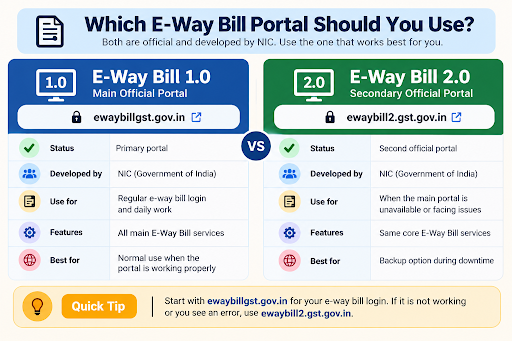
Independent guide: ewaybillinfo.com is not the government E-Way Bill or GST portal and has no link with GSTN, NIC or the Government of India. We never ask for your password or OTP. Enter them only on the official ewaybillgst.gov.in or ewaybill2.gst.gov.in sites.
When the extension window opens and closes
Every e-way bill expires at midnight on its last valid day. The official E-Way Bill FAQ says the extend option is available from 8 hours before that expiry until 8 hours after it. Outside those 16 hours the portal will not take your request, however good the reason.
Here is how that works on an actual bill. Say your bill is valid up to midnight at the end of 15 November.
| Time | Can you extend? |
|---|---|
| Before 4:00 PM on 15 November | No. The window has not opened yet |
| 4:00 PM on 15 November to midnight | Yes. This is the safer half of the window, because the bill is still live |
| Midnight to 8:00 AM on 16 November | Yes, but the bill has already expired. The goods should not be moving during this gap |
| After 8:00 AM on 16 November | No. The extend option is closed for this bill |
Rule 138(10) of the CGST Rules talks about extending within eight hours of expiry, and the portal also opens the option eight hours earlier. In practice, treat the evening before expiry as your deadline. Night drivers often lose phone signal, transporters’ offices shut, and an OTP that does not arrive at 2 AM can cost you the whole window.
A habit that saves trouble
- Check the validity date on every bill the morning the truck leaves, not when it is already late
- If a delivery looks likely to slip, ask the transporter to extend by early evening on the last valid day
- Keep the transporter’s contact person and their login holder’s number on the dispatch register
Who can extend, and who cannot
The official FAQ gives this right to the transporter who is carrying the goods as per the e-way bill system at the time of expiry. NIC’s user manual puts it more strictly: only the present transporter of the bill can extend its validity. So the question is not who made the bill, but whose name the portal shows as the transporter right now.
| Your situation | Who does the extension |
|---|---|
| You assigned a transporter ID (GSTIN or TRANSIN) to the bill | That transporter, from their own login |
| You moved the goods yourself and no other transporter was assigned | You, as the party shown as transporter on the bill |
| The goods changed hands to a new transporter mid-way | The latest transporter assigned on the portal |
| The goods are on a consolidated e-way bill | Each individual bill has to be extended. The FAQ says a consolidated bill has no validity of its own |
If the wrong transporter is on the bill, fix that first with Update EWB Transporter. That step, together with Part B updates and cancellation, is explained on our e-way bill management guide, so it is not repeated here.
One thing nobody can change during an extension is Part A. The invoice number, value, HSN, buyer and delivery address stay exactly as they were.
Reasons that qualify for an extension
Extension is meant for delays you could not control. The official FAQ names natural calamity, law and order problems, transshipment delay and accident of the conveyance, and asks the transporter to explain the reason in detail. Pick the closest reason from the dropdown and write a plain, specific remark, such as the place of the breakdown and what happened, rather than one word.
| What happened on the road | What to do | What to select on the form |
|---|---|---|
| Truck broke down, repaired, and will still reach before the bill expires | Nothing. The FAQ says you can continue on the same bill | No extension needed |
| Truck broke down and the goods were shifted to another vehicle, still within validity | Update the vehicle number in Part B. A Part B update does not add any days | No extension needed yet |
| Breakdown or accident means the goods will reach after expiry | Extend in the window | In Movement, the new vehicle number and the PIN code where the breakdown happened |
| Goods are parked at a godown, a transshipment point or a roadside halt | Extend in the window | In Transit, then the transit type and the address and PIN code of that place |
| Road closed by flood, landslide or a bandh | Extend in the window | The matching reason, with the closure details in remarks |
How to extend an e-way bill on the portal
These steps follow the Extend Validity section of NIC’s E-Way Bill user manual and the official FAQ. Screen layouts change from time to time, but the menu names below are the ones NIC uses.
What you need before you start
- The login of the party shown as transporter on the bill, and access to the registered mobile for the OTP
- The e-way bill number
- Where the goods are right now: the place, its PIN code and, if they are parked, the full address
- The approximate road distance from that place to the delivery PIN code
- The new vehicle number, if the goods have moved to another truck
Step 1. Log in to the portal
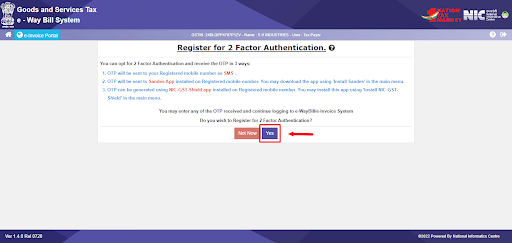
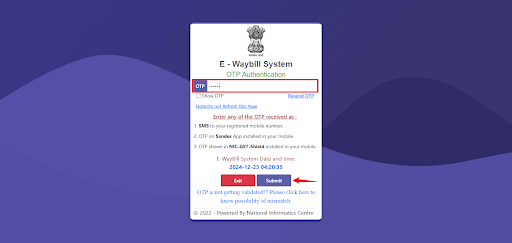
Go to ewaybillgst.gov.in (or ewaybill2.gst.gov.in, which stays in sync with the main portal; our e-way bill login guide has the full steps) and sign in with the transporter’s username, password and OTP.
Step 2. Open Extend Validity
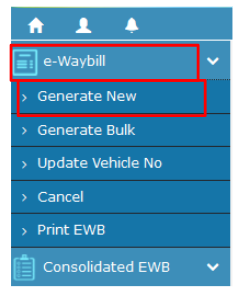
From the main menu, go to e-Waybill > Extend Validity. You will see a box asking for the e-way bill number.
Step 3. Enter the bill number
Type the e-way bill number and continue. The bill’s details come up. If the system says you cannot extend it, check the time window and whether your login is the current transporter on the bill.
Step 4. Say Yes and give the reason
Against the extend question, choose Yes. Select the reason from the dropdown and explain it in the remarks box. A clear remark helps if an officer questions the bill later.
Step 5. Tell the portal where the goods are
Choose In Movement if the goods are on a vehicle and travelling, then select the mode and enter the vehicle number. Choose In Transit if the goods are parked, then pick the transit type (On Road, Warehouse or Others) and fill the address of that place.
Step 6. Enter the current place and remaining distance
Fill the place and PIN code where the goods are now and the approximate distance still to travel. The destination PIN code is picked from Part A, so you only enter the distance left, not the full trip.
Step 7. Submit and check the new date
Submit the form. Once the system accepts it, the bill shows a new validity date and time. Take a fresh print or PDF for the driver, as explained in our guide to printing an e-way bill, so the paper in the truck matches the portal.
How much extra time you get
The FAQ says the extended validity is based on the remaining distance to travel, not on the original trip. The same distance rule that applies to a fresh bill applies again: one day for every 200 km or part of it for normal cargo, and one day for every 20 km for over-dimensional cargo. NIC’s manual adds that the extended validity, like the original, runs until midnight of the last day.
A quick example. A truck from Surat to Kolkata breaks down near Nagpur on the last valid day, and about 1,150 km are still left. That is six blocks of 200 km (the last one partly used), so the extension gives six more days. If the truck had only 180 km left, it would get one day.
The full slab table and the midnight rule are on our e-way bill limit and validity rules page. If you are unsure what distance to enter, our PIN-to-PIN distance guide shows how the portal measures it.
The 360-day ceiling
GSTN’s advisory of 17 December 2024 said that from 1 January 2025, extension of e-way bills is limited to 360 days from the original date of generation. The official FAQ does not put a number on how many times you can extend, so the practical limit is this 360-day ceiling plus a genuine reason each time. If goods are stuck for weeks and you keep extending, talk to your tax adviser about whether that still makes sense.
Missed the window? What you can still do
Once 8 hours have passed after expiry, the extend option closes for good on that bill. The FAQ is clear that goods are not supposed to move on an expired e-way bill. If they are stopped, the officer can treat it as goods moving without a valid e-way bill, which is covered on our e-way bill penalty page.
Do not restart the truck on an expired bill. Keep the goods where they are and speak to your tax adviser or the consignor’s accounts team about how to cover the rest of the journey before the vehicle moves again.
Cancelling the old bill is usually not an option at this stage, since cancellation is allowed only within 24 hours of generation and not after an officer has verified the bill.
If it does not work
| What you see | What to try |
|---|---|
| Extend Validity does not accept the bill | Check the clock against the validity time on the bill. More than 8 hours before expiry, or more than 8 hours after, the option will not work |
| You are inside the window but still blocked | Your login may not be the current transporter on the bill. Ask the assigned transporter to extend, or have the generator reassign it |
| The bill has reached 360 days from generation | No further extension is possible on that bill. Take advice before the goods move |
| Distance is not accepted | Re-check the current PIN code and the remaining distance. The distance guide explains the checks the portal runs |
| The main portal is slow or down near the deadline | Try ewaybill2.gst.gov.in, which works on the same data. Do not wait for the main site to come back |
E-way bill extension FAQs
Can I extend an e-way bill after it has expired?
Yes, but only for 8 hours after expiry. For a bill valid up to midnight, that means until 8 AM the next morning. After that, the option closes for that bill.
Does updating the vehicle number give the bill more days?
No. The official FAQ says validity is not recalculated when Part B is updated later. Only Extend Validity adds days.
Can the supplier extend the bill if a transporter is already assigned?
Not from their own login. The present transporter on the bill has to do it. The supplier can reassign the bill to a different transporter if needed.
How many times can an e-way bill be extended?
The official FAQ does not set a number. Each extension needs a genuine reason, has to be done inside the window, and the total life of the bill cannot go past 360 days from generation.
Do I extend the consolidated e-way bill or the individual ones?
The individual ones. A consolidated e-way bill has no validity of its own, so each bill inside it has to reach within its own validity or be extended separately.
Can I change the delivery address while extending?
No. Extension does not touch Part A, so the delivery address, invoice and goods details stay the same.
Found this useful? Share it with your accounts team.
Related E-Way Bill guides
Bill extended? These guides cover what comes before and after an extension.
After generation
E-Way Bill Management
Update Part B, change the transporter, cancel within 24 hours or reject a bill raised on you.
Rules
E-Way Bill Limit, Rules and Validity
When a bill is needed, the ₹50,000 test, exemptions and how many days each distance slab gets.
Distance
E-Way Bill Distance: PIN-to-PIN Check
How the portal measures distance, the 10% rule and fixing a wrong figure before it hits validity.
-
E-Way Bill Limit in Maharashtra: ₹1 Lakh Rule and Exemptions
Read the guide →: E-Way Bill Limit in Maharashtra: ₹1 Lakh Rule and ExemptionsMaharashtra needs an e-way bill inside the state only above ₹1 lakh, with no separate city limit, and goods going…
-

E-Way Bill Limit in Rajasthan: ₹50,000, ₹1 Lakh or ₹2 Lakh?
Read the guide →: E-Way Bill Limit in Rajasthan: ₹50,000, ₹1 Lakh or ₹2 Lakh?Rajasthan has three e-way bill limits: ₹50,000 for goods crossing the state border, ₹1 lakh within the state and ₹2…
-
How to Cancel an E-Way Bill: 24-Hour Rule and Steps
Read the guide →: How to Cancel an E-Way Bill: 24-Hour Rule and StepsCancel an e-way bill within 24 hours of generation from the login that made it: see how the clock runs,…
ewaybillinfo.com
Independent guides to E-Way Bill login, registration, generation, management, limits, penalties and latest updates. Always use the official government portal for account actions.
Guides
Official portals
© 2026 ewaybillinfo.com. All rights reserved.
Independent informational website. ewaybillinfo.com is not affiliated with, endorsed by, or operated by the Government of India, GSTN, NIC, CBIC, or the official E-Way Bill portal. Information on this site is provided for general guidance and may change as government rules, portal features, or procedures are updated. Always verify important details on the official government portal before taking action. We never ask for your E-Way Bill password, OTP, login credentials, or other sensitive account information.