● E-Way Bill Guides · Last checked: November 2026
How to Cancel an E-Way Bill: 24-Hour Rule and Steps
Blog · Published 16 November 2026 · 8 min read
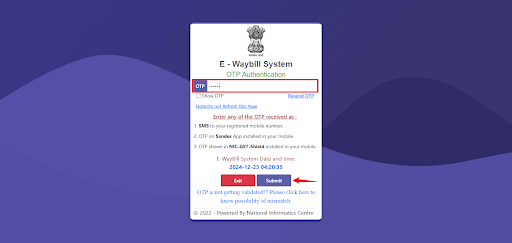
You can cancel an e-way bill only within 24 hours of the time it was generated, and only from the login that generated it. On the portal it is a short job: e-Waybill > Cancel, enter the 12-digit e-way bill number, pick a reason and confirm. Once an officer has verified the bill on the road, it can no longer be cancelled, and after 24 hours the Cancel option simply stops working for that bill.
Most cancellations happen because something in Part A went wrong: the wrong GSTIN, invoice number, value or delivery PIN code. The fix is always the same, cancel and make a fresh bill. Below is how to read the 24-hour clock on your own bill, when cancelling is the wrong move, the exact steps, and what is left once the time is up.
Independent guide: ewaybillinfo.com is not the government E-Way Bill or GST portal and has no link with GSTN, NIC or the Government of India. We never ask for your password or OTP. Enter them only on the official ewaybillgst.gov.in or ewaybill2.gst.gov.in sites.
How the 24-hour clock runs
The official E-Way Bill FAQ says cancellation has to be done “within twenty-four hours from the time of generation”. That means the clock starts at the exact time printed on the bill as its generation date and time, not at midnight and not when Part B is filled in. This is different from validity, which ends at midnight. Do not mix the two up.
Take a bill generated at 11:40 AM on 16 November:
| Time | Can the generator cancel? |
|---|---|
| 11:40 AM on 16 November to 11:40 AM on 17 November | Yes, as long as no officer has verified it |
| After 11:40 AM on 17 November | No. The Cancel option will not accept the bill |
| Any time after an officer has verified it in transit | No, even if it is still inside 24 hours |
If a bill was generated late at night, the deadline falls late the next night too. Accounts teams that only check the dispatch register the next morning often find they have a few hours left, not a full day.
A habit that saves trouble
- Check every new bill against the invoice before the vehicle leaves the gate, not the next day
- Note the generation time beside the bill number in your dispatch register
- If an order is put on hold, cancel the bill the same day instead of waiting to see if it moves
When to cancel, and when another option fits
The CBIC e-way bill FAQ allows cancellation in two cases: the goods are not being transported at all, or they are not being transported as per the details in the bill. A bill cannot be edited or deleted, so for a Part A mistake cancellation is the only correction. Many problems, though, sit in Part B or in the timing, and those have their own fixes.
| What went wrong | Right move |
|---|---|
| Order cancelled or goods will not be sent | Cancel |
| Same consignment billed twice by mistake | Cancel the extra bill |
| Wrong GSTIN, invoice number, date, value, HSN or quantity | Cancel and generate a new bill with the correct details |
| Wrong delivery PIN code or distance | Cancel and generate a new bill (both sit in Part A) |
| Wrong or changed vehicle number | Do not cancel. Update the vehicle number in Part B |
| Wrong transporter assigned | Do not cancel. Use Update EWB Transporter |
| Goods will reach after the bill expires | Do not cancel. Extend the validity in time |
Part B updates and transporter changes are covered on our e-way bill management page, and late deliveries on our e-way bill extension guide. Cancelling a correct bill just because the truck changed only creates extra work and a gap in your paperwork.
Who is allowed to cancel
Only the generator. NIC’s API document and the official FAQ both say this plainly. If your transporter made the bill, they cancel it from their login; if you made it, the transporter cannot cancel it for you. The other party named on the bill cannot cancel it at all. They can only reject it, within 72 hours or before delivery, whichever is earlier, and our management page explains that route.
Steps to cancel an e-way bill on the portal
These steps follow NIC’s E-Way Bill user manual, which lists the option as Cancel under the e-way bill menu. Screens get small design changes from time to time, but the flow has stayed the same.
What you need before you start
- The username, password and OTP access of the login that generated the bill
- The 12-digit e-way bill number
- The generation time, so you know how much of the 24 hours is left
- A one-line reason you can type as a remark
Step 1. Log in
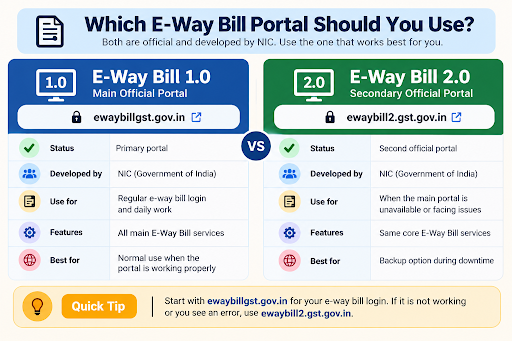
Sign in at ewaybillgst.gov.in. If the main portal is slow, ewaybill2.gst.gov.in works on the same data. New to the portal? Our e-way bill login guide covers each sign-in step.
Step 2. Open the Cancel option
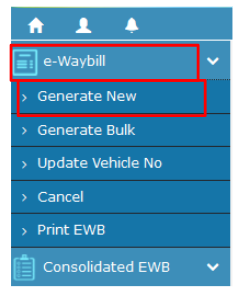
From the main menu, go to e-Waybill > Cancel. A box asks for the e-way bill number.
Step 3. Enter the number and click Go
Type the 12-digit number and click Go. The portal shows the bill. Read the invoice number, the other party and the value once before going further, because a cancellation cannot be undone.
Step 4. Pick a reason and add a remark
Choose the closest reason. NIC’s code list has four: Duplicate, Order Cancelled, Data Entry mistake and Others. Add a short remark such as “Wrong buyer GSTIN, new bill to follow”. Keep it brief; the API version of this field takes only 50 characters.
Step 5. Confirm the cancellation
Submit. The bill’s status changes to cancelled. The user manual warns that using a cancelled bill is not allowed, so pull back any printed copy already given to the driver.
Step 6. Generate the replacement, if goods still have to move
Create a fresh bill with the correct details from our step-by-step generation guide, print it and hand that copy to the driver. Hold the vehicle until the new bill is ready; the CBIC FAQ says goods in movement must always carry a valid e-way bill.
Messages that stop a cancellation
When the portal refuses, the message usually tells you why. The ones below come from the error list in NIC’s e-way bill API document. The wording on the website screen can differ slightly, but the causes are the same.
| Message | What it means | What to do |
|---|---|---|
| “This eway bill is either not generated by you or cancelled” | You are logged in as someone other than the generator, or the bill is already cancelled | Ask the party who generated it to cancel. Check the status first in case it is already done |
| “Eway bill is already verified, you cannot cancel it” | An officer verified the bill during transit | Cancellation is closed. Speak to your tax adviser about the next step |
| “Validity period lapsed, you cannot cancel this eway bill” | The bill’s validity has ended | No cancellation is possible. See the next section |
| “Could not cancel eway bill, please contact helpdesk” | A system-side problem | Try again on ewaybill2.gst.gov.in, then contact the helpdesk with the bill number and a screenshot, well before the 24 hours run out |
| Bill not accepted with no clear message | Usually the 24 hours have passed | Compare the current time with the generation time on the bill |
To confirm the cancellation went through, look the bill up again. Our guide on checking e-way bill status shows where cancelled bills appear in the Reports menu.
Past the 24 hours: your remaining options
There is no late cancellation on the portal. The official FAQ does not give any route to cancel after 24 hours, and some websites that promise one are only describing rejection by the other party. What you can still do depends on the mistake:
- The goods never moved. Leave the bill alone. It stays on record until its validity ends. Keep a note in your file of why it was not used, along with your invoice cancellation entry or credit note, so the trail is clear if anyone asks.
- The mistake is in Part B. Vehicle and transporter details can still be updated while the bill is valid, so you do not need cancellation.
- The bill names a buyer who never placed the order. That buyer can reject it within 72 hours of generation or before delivery, whichever is earlier, if the window is still open.
- Part A is wrong and the goods are moving. Do not let the vehicle carry a bill that does not match the invoice. Stop and take advice from your tax adviser before the goods go further.
GSTN had announced a voluntary closure facility for e-way bills in 2026, but it was put on hold before going live. Our e-way bill new update page tracks whether that changes.
Do not reuse a cancelled bill. NIC’s user manual calls it illegal to use a cancelled e-way bill. If a driver is stopped with one, the goods are treated as moving without a valid bill. Always replace the printed copy as soon as you cancel.
E-way bill cancellation FAQs
Does the 24 hours start again if I update Part B?
No. The official FAQ counts the 24 hours from the time the bill was generated. Adding or changing vehicle details later does not reset that clock.
My transporter generated the bill. Can I cancel it as the supplier?
Not from your login. Only the generator can cancel, so the transporter has to do it from their account within 24 hours.
Does cancelling the e-way bill also cancel my invoice or e-invoice?
No. The e-way bill is a movement document. Your invoice is handled in your books and GST returns, and an e-invoice (IRN) has its own cancellation on the e-invoice portal, which also has a 24-hour limit.
Can I cancel if the truck has already left?
Yes, within 24 hours, if the goods are not moving as per the bill and no officer has verified it. Bring the vehicle to a halt until the new bill is generated, because goods on the road must carry a valid bill.
Which reason should I select?
The closest of the four: Duplicate, Order Cancelled, Data Entry mistake or Others. Use the remark box to say what was wrong in a few words.
Found this useful? Share it with your accounts team.
Related E-Way Bill guides
Cancelled the old bill? These guides cover the next steps.
After generation
E-Way Bill Management
Update Part B, change the transporter or reject a bill someone raised on your GSTIN.
Make a new bill
How to Generate an E-Way Bill
Fill Part A and Part B correctly the second time, with the fields that most often go wrong.
Check
Check E-Way Bill Status
Confirm a bill shows as cancelled, and see bills others generated on your GSTIN.
-
E-Way Bill Limit in Maharashtra: ₹1 Lakh Rule and Exemptions
Read the guide →: E-Way Bill Limit in Maharashtra: ₹1 Lakh Rule and ExemptionsMaharashtra needs an e-way bill inside the state only above ₹1 lakh, with no separate city limit, and goods going…
-

E-Way Bill Limit in Rajasthan: ₹50,000, ₹1 Lakh or ₹2 Lakh?
Read the guide →: E-Way Bill Limit in Rajasthan: ₹50,000, ₹1 Lakh or ₹2 Lakh?Rajasthan has three e-way bill limits: ₹50,000 for goods crossing the state border, ₹1 lakh within the state and ₹2…
-
E-Way Bill Extension: Time Window, Steps and Limits
Read the guide →: E-Way Bill Extension: Time Window, Steps and LimitsExtend an e-way bill in the 8-hours-before to 8-hours-after window, pick In Movement or In Transit, enter the remaining distance…
ewaybillinfo.com
Independent guides to E-Way Bill login, registration, generation, management, limits, penalties and latest updates. Always use the official government portal for account actions.
Guides
Official portals
© 2026 ewaybillinfo.com. All rights reserved.
Independent informational website. ewaybillinfo.com is not affiliated with, endorsed by, or operated by the Government of India, GSTN, NIC, CBIC, or the official E-Way Bill portal. Information on this site is provided for general guidance and may change as government rules, portal features, or procedures are updated. Always verify important details on the official government portal before taking action. We never ask for your E-Way Bill password, OTP, login credentials, or other sensitive account information.