● E-Way Bill Guides · Last checked: November 2026
E-Way Bill OTP Not Received? Causes and Fixes That Work
Blog · Published 2 November 2026 · 8 min read
If your e-way bill OTP is not received, the cause is usually one of four things: Do Not Disturb (DND) blocking the SMS, a weak network, an old mobile number still saved against your GSTIN, or a sub-user waiting on the main user’s phone. Turn off DND, wait a couple of minutes before asking for a new OTP, and check which number the OTP is going to. If the number is old, it has to be changed on the GST portal first, not on the E-Way Bill portal.
Since 1 April 2025 every user needs an OTP to log in, so a missing OTP now stops work completely. The fixes below are in the order I would try them, starting with the ones that take ten seconds.
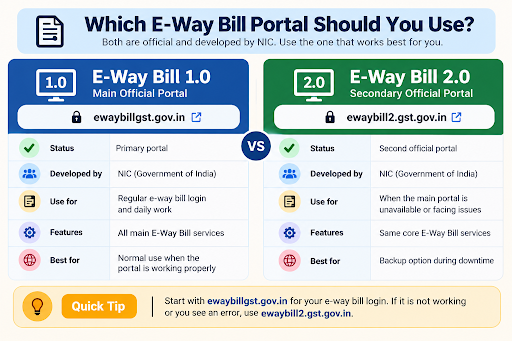
Independent guide: this website is not the government E-Way Bill portal and is not run by GSTN, NIC or the Government of India. We will never ask for your password or OTP. Type them only on the official ewaybillgst.gov.in or ewaybill2.gst.gov.in sites, and never share an OTP with a caller.
Try these five things first
Quick checks before anything else
- Turn off DND on the registered mobile, or allow transactional/service messages. The official CBIC e-way bill FAQ names DND as the first thing to check.
- Wait 2 to 3 minutes before pressing resend. Asking again and again can leave you with several codes and only the latest one will usually work.
- Check signal. SMS needs mobile network. Restarting the phone or switching airplane mode on and off often reconnects it.
- Look in the Sandes app if it is installed on the registered number. The OTP can arrive there instead of SMS.
- Confirm the number. The OTP goes to the mobile number linked to your GSTIN (or to the sub-user’s own number). If that SIM is no longer with you, see the section on changing the number below.
Which OTP are you waiting for?
The portal sends OTPs at different points, and each one goes to a slightly different place. Knowing which one you are stuck on saves a lot of guessing.
| Where you are stuck | Where the OTP goes | Main fix |
|---|---|---|
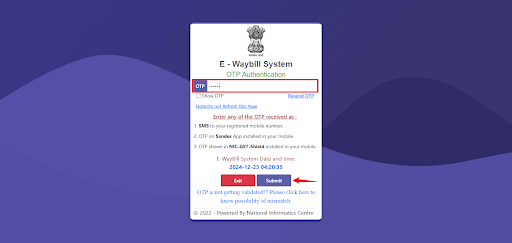
| Logging in (after username, password and captcha) | SMS to the registered mobile, the Sandes app, or the NIC-GST-Shield app, depending on your 2FA set-up | DND, signal, or switch to the NIC-GST-Shield app once you are able to log in |
| New registration on the E-Way Bill portal with your GSTIN | The mobile number in your GST registration | Correct the number on the GST portal through a non-core amendment |
| Forgot password | SMS or email registered with the GSTIN (as per the NIC user manual) | Check email and spam folder too; update details if they are old |
| Creating a sub-user | The main user verifies with OTP first; the sub-user later receives their own SMS | Main user checks the mobile number entered for the sub-user |
For first-time sign-up problems, our E-Way Bill registration guide covers the full process.
Why the e-way bill OTP does not arrive
| Cause | How you can tell | What to do |
|---|---|---|
| DND is on | Other bank or service SMS are also missing | Turn off DND or allow service messages, then request a fresh OTP |
| Weak or no network | Calls drop, data is slow, no recent SMS at all | Move to better signal, restart the phone, or use NIC-GST-Shield (works without network) |
| Old mobile number linked to GSTIN | You changed SIM or the authorised signatory left | Change the number on the GST portal, then pull it into the E-Way Bill portal |
| Sub-user OTP going to their own number | The main user gets nothing, the staff member’s phone does | Each sub-user is verified on the number registered for that sub-user |
| NIC-GST-Shield code rejected | The app shows a code but the portal says it is wrong | Set the phone’s date and time to automatic so it matches the portal time |
| Too many resend clicks | Several OTPs received, none of them work | Wait a few minutes, request once, and use only the latest code |
Fix 1: SMS OTP not coming
Turn off Do Not Disturb
On most Android phones DND sits in the quick settings panel; on an iPhone it is under Focus. The CBIC e-way bill FAQ answers the question “I am not getting OTP on my mobile, what should I do?” by asking you to check DND first, so start here.
Give it a couple of minutes
SMS can be delayed when networks or the portal are busy. Wait 2 to 3 minutes before you press resend. When the codes finally arrive, enter the newest one.
Check the phone itself
Make sure the SIM linked to your GSTIN is the one in the phone, that the inbox is not full, and that no spam-blocking app has moved the message to a junk folder. Dual-SIM phones sometimes put the registered number in the second slot with SMS turned off.
Fix 2: OTP going to an old mobile number
If the OTP keeps going to a number you no longer use, waiting will not fix it. The number linked to your GSTIN can only be changed on the GST portal, and the E-Way Bill portal then picks it up. Our step-by-step guide on how to change your mobile number on the E-Way Bill portal covers the GST amendment, the update on the E-Way Bill side and sub-user numbers.
Locked out because the OTP goes to the old number? Once the GST portal shows the new number, use the Update from GST Common Portal option on the forgot-password screen.
Fix 3: Use the NIC-GST-Shield app
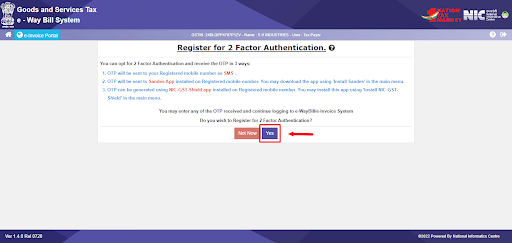
If SMS is unreliable where you work, an app-based OTP is the long-term fix. NIC’s 2FA help note lists three ways to get the login OTP:
| OTP method | Needs | Good to know |
|---|---|---|
| SMS | Mobile signal on the registered number | Affected by DND and network delays |
| Sandes app | Internet, app installed on the registered number | Government messaging app; OTP appears inside the app |
| NIC-GST-Shield app | No internet or signal | Code refreshes every 30 seconds; phone time must match portal time |
You can only set this up after you have logged in once, so do it the next time the SMS does arrive.
Step 1. Open the 2FA menu
After logging in, go to Main Menu > 2-Factor Authentication.
Step 2. Download the app from the portal link
Use the Install NIC-GST-Shield link inside that menu. NIC says the app should be downloaded only through the portal, not from a link someone sends you.
Step 3. Register it on your registered mobile
Install the app on the phone with the registered mobile number and complete its registration.
Step 4. Log in with the app code
At the next login, enter your username, password and captcha, then open the app and type the code it shows. If the code is rejected, set the phone’s date and time to automatic and try a fresh code.
More on how 2FA works on both portals is on our E-Way Bill login page.
Sub-user not getting the OTP
NIC’s 2FA note says each user is verified separately. A sub-user gets the OTP on the mobile number saved for that sub-user, not on the owner’s phone. So if a staff member says the OTP is not coming, the first question is which number was entered when the sub-user was created.
The main user can check this under User Management > Update Sub-User. If the staff member has left, the main user can freeze that sub-user from the same menu, and a frozen sub-user can no longer log in.
If it still does not work
| Situation | Next step |
|---|---|
| DND off, signal fine, still no SMS after 10 minutes | Try again a little later, and ask colleagues who use the portal whether they are facing the same delay. If everyone is stuck, the problem is on the portal side, not your phone. |
| Number changed on GST portal but E-Way Bill portal still shows the old one | Use Update from GST Common Portal again. If it still does not change, raise a ticket. |
| NIC-GST-Shield code always rejected | Set date and time to automatic and use a fresh code. If it still fails, raise a ticket with the GST helpdesk. |
| Phone lost and no other way to log in | Get a duplicate SIM for the same number from your operator, or change the number on the GST portal as shown above. |
| Nothing above works | Call the GST helpdesk on 1800-103-4786 (toll free) or raise a ticket at selfservice.gstsystem.in. Keep your GSTIN, username and a screenshot of the screen ready. |
For password, captcha or blocked-account problems, see E-Way Bill login not working: all common fixes. To check the dates when 2FA became compulsory, read our latest E-Way Bill updates.
E-Way Bill OTP FAQs
Can I log in to the E-Way Bill portal without an OTP?
No. A GSTN advisory dated 17 December 2024 made two-factor authentication compulsory in phases, and it has applied to all taxpayers and users since 1 April 2025.
Can I change my mobile number on the E-Way Bill portal itself?
No. The CBIC FAQ says the E-Way Bill system does not allow this directly. Change it on the GST portal through a non-core amendment, then use the update option on the E-Way Bill portal to fetch the new details.
Why is the OTP going to my accountant’s phone?
Because that number is saved as the authorised signatory’s mobile on the GST registration, or your accountant is logging in as a sub-user with their own number. Update the GST registration or the sub-user details, whichever applies.
Does the NIC-GST-Shield app need internet?
No. NIC says the app can show the OTP without internet or mobile network. The phone’s clock must match the portal time, and the code changes every 30 seconds.
Is the e-way bill OTP sent to email?
It can be. The official E-Way Bill FAQ asks you to check your registered email as well as your mobile when the OTP does not arrive, so look in your inbox and spam folder too. The login OTP can also come through the Sandes or NIC-GST-Shield app if you have set one up.
Is it safe to share the OTP with a helpdesk caller?
No. Never share an OTP with anyone, including a caller who says they are from a helpdesk or the tax department. This website will never ask for it either.
Found this useful? Share it with your accounts team.
Related E-Way Bill guides
Still stuck at login, or setting up the portal for the first time? These guides pick up where this one ends.
Troubleshooting
E-Way Bill Login Not Working
Fixes for captcha errors, invalid username or password, blocked accounts and portal downtime.
Login
E-Way Bill Login: Official Portal Links
The two official portals, step-by-step login and how 2FA works with SMS, Sandes and NIC-GST-Shield.
Getting started
E-Way Bill Registration
Register with your GSTIN, create sub-users, or enrol as a transporter to get a TRANSIN.
-
E-Way Bill Limit in Maharashtra: ₹1 Lakh Rule and Exemptions
Read the guide →: E-Way Bill Limit in Maharashtra: ₹1 Lakh Rule and ExemptionsMaharashtra needs an e-way bill inside the state only above ₹1 lakh, with no separate city limit, and goods going…
-

E-Way Bill Limit in Rajasthan: ₹50,000, ₹1 Lakh or ₹2 Lakh?
Read the guide →: E-Way Bill Limit in Rajasthan: ₹50,000, ₹1 Lakh or ₹2 Lakh?Rajasthan has three e-way bill limits: ₹50,000 for goods crossing the state border, ₹1 lakh within the state and ₹2…
-
How to Cancel an E-Way Bill: 24-Hour Rule and Steps
Read the guide →: How to Cancel an E-Way Bill: 24-Hour Rule and StepsCancel an e-way bill within 24 hours of generation from the login that made it: see how the clock runs,…
ewaybillinfo.com
Independent guides to E-Way Bill login, registration, generation, management, limits, penalties and latest updates. Always use the official government portal for account actions.
Guides
Official portals
© 2026 ewaybillinfo.com. All rights reserved.
Independent informational website. ewaybillinfo.com is not affiliated with, endorsed by, or operated by the Government of India, GSTN, NIC, CBIC, or the official E-Way Bill portal. Information on this site is provided for general guidance and may change as government rules, portal features, or procedures are updated. Always verify important details on the official government portal before taking action. We never ask for your E-Way Bill password, OTP, login credentials, or other sensitive account information.